
Topics, Wildcards & QoS (MQTT Advanced)
Master MQTT topic structures, wildcard matching, Quality of Service (QoS) levels, and advanced messaging options.
Welcome back! Now that we have covered the basics of MQTT architecture, it is time to explore the advanced features that make MQTT incredibly flexible and reliable.
In this guide, we will examine Topics, Wildcards, QoS Levels, Retained Messages, and Last Will & Testament (LWT) in detail.
📂 MQTT Topics Structure
In MQTT, messages are sent to specific addresses called Topics. Topics are plain text strings separated by forward slashes (/), forming a hierarchical directory-like structure.
For example, a home automation system might structure topics like this:
myhome/livingroom/temperaturemyhome/livingroom/humiditymyhome/kitchen/gas_sensor
💡 Crucial Topic Rules:
- Case-Sensitivity:
myhome/lightandMyHome/Lightare treated as two completely different topics. - UTF-8 Support: While you can use spaces (e.g.,
myhome/living room), it is highly discouraged as it makes debugging harder. Use underscores (_) or hyphens (-) instead. - Avoid Leading Slashes: Do not start a topic with a slash (e.g.,
/myhome/light). This creates an empty root level and wastes resources. Always start directly:myhome/light.
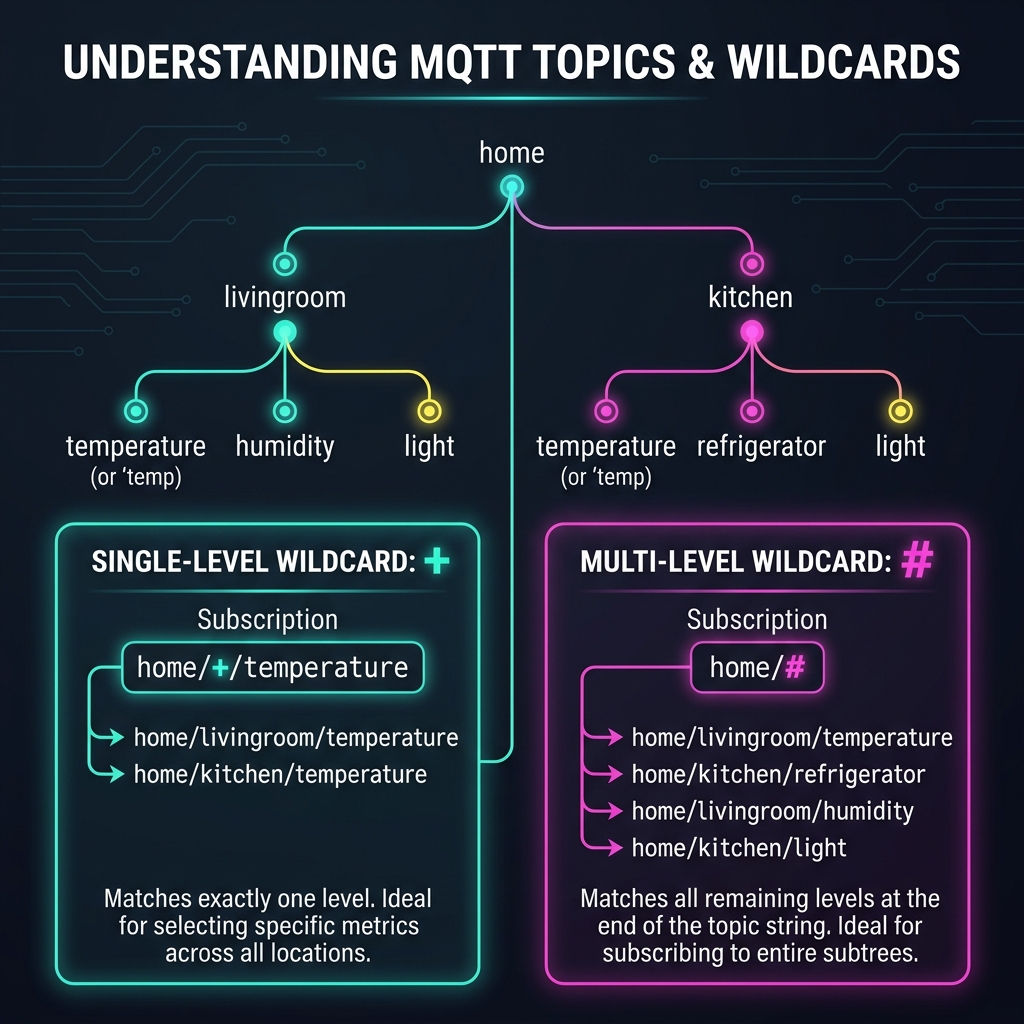
🃟 Wildcards: Filtering Multiple Topics
Imagine a house with 10 rooms, each containing a temperature sensor:
home/room1/temphome/room2/temp- ...
home/room10/temp
If you wanted to subscribe to all of these sensors, you wouldn't want to create 10 separate subscriptions. Instead, MQTT provides Wildcards to subscribe to multiple topics at once.
MQTT supports two types of wildcards:
1. Single-Level Wildcard (+)
This wildcard matches exactly one topic level in the middle of a path.
- Pattern:
home/+/temp - Matches:
- ✅
home/room1/temp - ✅
home/room2/temp - ✅
home/kitchen/temp
- ✅
- Does NOT Match:
- ❌
home/room1/floor2/temp(because it has two levels where the+is).
- ❌
2. Multi-Level Wildcard (#)
This wildcard matches all remaining levels of a topic path. It must always be placed at the very end of a topic.
- Pattern:
home/# - Matches:
- ✅
home/room1/temp - ✅
home/kitchen/light/status - ✅
home/livingroom/ac/speed/value
- ✅
- Rule: You cannot use
#in the middle of a topic (e.g.,home/#/tempis invalid).
⚡ Quality of Service (QoS) Levels
Quality of Service (QoS) determines the reliability of message delivery between clients and the broker. MQTT has three levels:
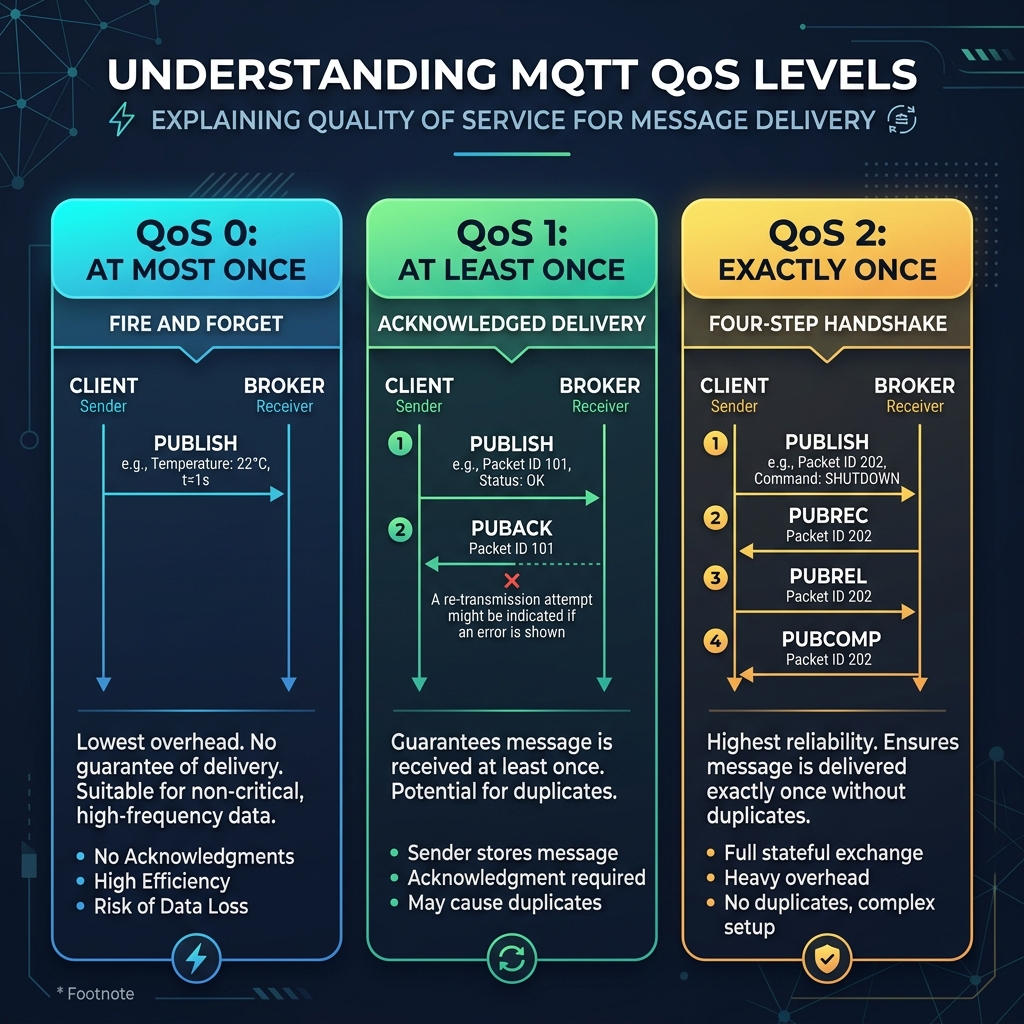
🔴 QoS 0: At most once (Fire & Forget)
- How it works: The publisher sends the message once, and the broker does not send an acknowledgment. There is no retry logic.
- Pros: Fastest delivery with minimal network overhead.
- Cons: If a client goes offline or the network drops, the message is lost.
- Best For: Frequent, non-critical sensor readings (e.g., temperature telemetry sent every 10 seconds, where missing a single reading is fine).
🟢 QoS 1: At least once (Acknowledged Delivery)
- How it works: The publisher sends the message and waits for an acknowledgment (PUBACK) from the receiver. If none is received, it sends the message again.
- Pros: Guarantees that the message will reach its destination.
- Cons: The receiver might get duplicate messages if the acknowledgment was lost in transit.
- Best For: Critical control commands (e.g., turning a light relay ON or OFF).
🔵 QoS 2: Exactly once (Assured Delivery)
- How it works: Uses a 4-step handshake protocol between the sender and receiver to guarantee the message is delivered exactly once with no duplicates.
- Pros: Safest and most reliable level.
- Cons: Highest overhead and slowest delivery speed.
- Best For: Financial applications, billing systems, and critical industrial actuators where duplicate execution could cause system damage.
🛡️ Special Features: Retained Messages & Last Will
MQTT includes native features to handle device disconnects and initialization state:
1. Retained Messages
Typically, when a message is published, the broker sends it to subscribers and discards it. If a new subscriber connects later, it won't get any data until the next publish. By marking a message as Retained, the broker stores the last published message for that topic. As soon as a new client subscribes, the broker immediately sends this stored message.
2. Last Will and Testament (LWT)
LWT acts as a client's "emergency contact" update.
- When connecting, a client gives the broker an LWT topic and message (e.g., Topic:
home/status, Message:offline). - If the client disconnects unexpectedly (due to power loss, network failure, etc.), the broker automatically publishes the LWT message on the client's behalf to notify other devices.
🚀 Let's Build a Project!
With the theory complete, let's put it into practice. In the next guide, we will connect an ESP32 NodeMCU to a free public MQTT broker to publish temperature values and subscribe to control an LED.
MQTT Protocol Basics & Architecture
Learn the fundamentals of the MQTT protocol, the client-broker communication model, and why it is the standard for IoT.
ESP32 MQTT Home Automation (Hands-on Project)
Connect your ESP32 NodeMCU to a public MQTT broker, publish sensor readings, and subscribe to control an LED.