
MQTT Protocol Basics & Architecture
Learn the fundamentals of the MQTT protocol, the client-broker communication model, and why it is the standard for IoT.
Welcome to the MQTT Basics Guide! If you are stepping into the world of the Internet of Things (IoT), smart home automation, or embedded systems, MQTT is a term you will encounter everywhere.
In this guide, we will break down MQTT in a simple, intuitive, and human-friendly way—explaining how it works, its architecture, and why it is so widely used.
🧐 What is MQTT?
MQTT stands for Message Queuing Telemetry Transport. It is an extremely lightweight and simple network protocol designed for sending messages between devices.
It was created in 1999 by Andy Stanford-Clark (IBM) and Arlen Nipper (Arcom). Their goal was to monitor oil pipelines via satellites under harsh constraints. They needed a protocol that would be:
- Low Bandwidth: Efficient enough to work over slow, unstable, or expensive satellite links.
- Low Power: Suitable for remote sensors running on batteries.
- Low Footprint: Simple enough to run on tiny microcontrollers with very limited memory and CPU power (like the ESP8266 or ESP32).
Fun Fact: While it started as a niche industrial solution, today MQTT is the backbone of modern smart homes (like Home Assistant), connected vehicles, mobile chat apps (like Facebook Messenger's legacy backend), and industrial automation!
🔄 The Publish-Subscribe Pattern
Standard web applications rely on the Request-Response model (HTTP), where a client (like your web browser) asks for a page and the server sends it back.
MQTT operates on a decoupled Publish-Subscribe (Pub-Sub) model. Instead of communicating directly with each other, clients exchange messages through a central mediator called a Broker.
🏠 The YouTube Analogy
To understand Pub-Sub, think of how YouTube channels work:
- The Creator (Publisher): Uploads a video under a specific channel or category.
- YouTube (The Broker): Receives the new video, manages subscriptions, and hosts the content.
- The Viewer (Subscriber): Clicks the "Subscribe" button on a channel. Whenever a new video is uploaded, YouTube automatically delivers a notification to the viewer.
The viewer doesn't need to constantly ask the creator, "Have you uploaded a new video yet?". The broker (YouTube) handles the delivery.
🎨 MQTT Architecture Diagram
Here is a visual representation of how MQTT clients and brokers interact:
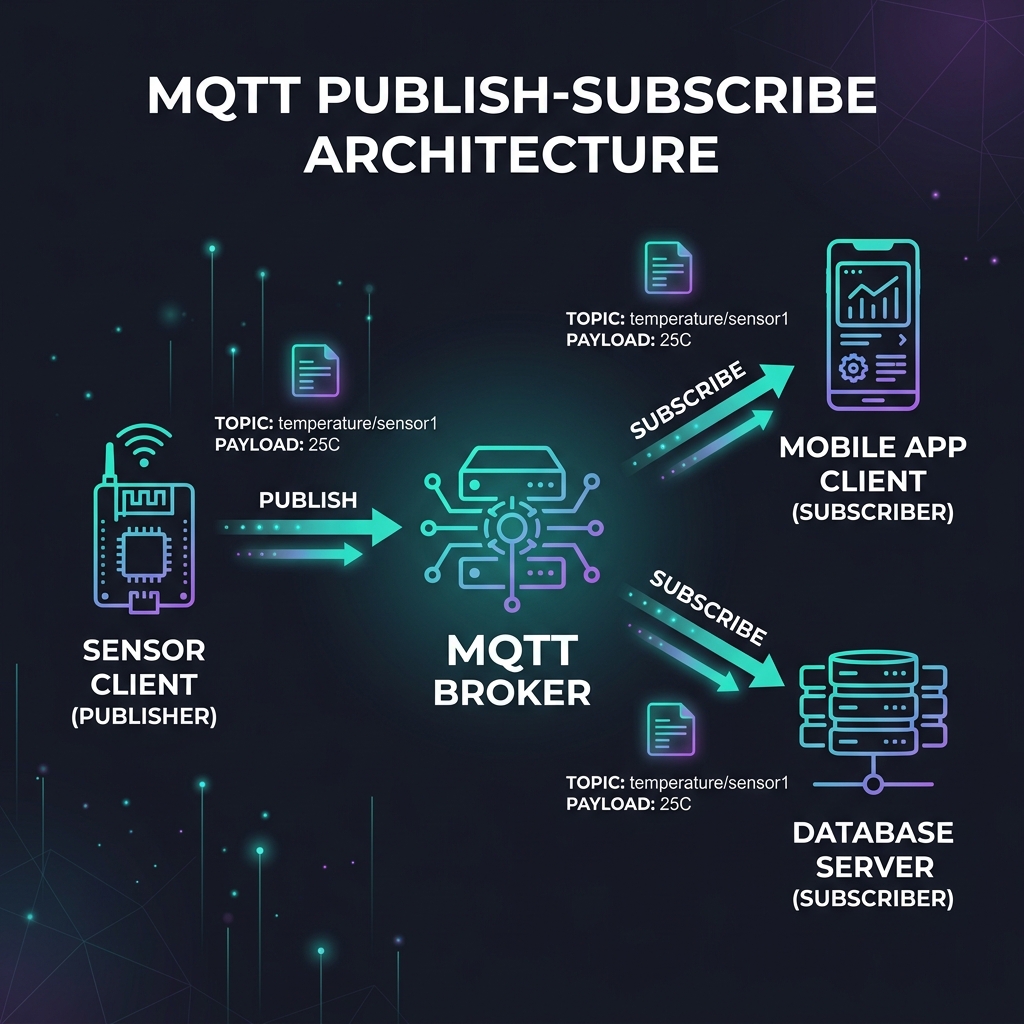
Key Terminology:
- MQTT Client: Any device (such as an ESP32, Raspberry Pi, server, or smartphone app) that connects to an MQTT broker to send or receive data.
- MQTT Broker: The central server. It receives all incoming messages, filters them by topic, and forwards them to the appropriate subscribers. Examples include Mosquitto, HiveMQ, EMQX, and Adafruit IO.
- Publish (Pub): The act of a client sending data to the broker. For example, a temperature sensor publishes
25°Cto a topic. - Subscribe (Sub): The act of a client telling the broker it wants to receive messages from a specific topic. For example, a mobile app subscribes to monitor temperature updates.
- Topic: A text string that represents the address/path of a message (e.g.,
home/livingroom/temperature). It acts like a folder path to organize messages.
📊 MQTT vs. HTTP (Comparison)
Why don't we just use HTTP for all IoT devices? Let's compare the two protocols:
| Feature | HTTP | MQTT |
|---|---|---|
| Model | Request / Response (Synchronous) | Publish / Subscribe (Asynchronous) |
| Header Size | Large (typically ~8KB or more) | Extremely Small (as low as 2 Bytes) |
| Connection | Opens and closes for each request | Kept open with tiny keep-alive heartbeats |
| Power Consumption | High (handshakes consume significant energy) | Very Low (ideal for battery-powered devices) |
| Delivery Guarantees | None built-in (relies on TCP retries) | QoS Levels (0, 1, 2) built directly into the protocol |
| Best For | Web pages, REST APIs, downloading files | Real-time sensor telemetry, device control |
🚀 What's Next?
Now that you understand the basic architecture, let's dive deeper into how messages are categorized and delivered reliably using Topics, Wildcards, and Quality of Service (QoS).
ESP32 Web Server (IoT Home Automation)
Apne home appliances ko local network se control karne ke liye ek custom Web Server banayein using ESP32 NodeMCU.
Topics, Wildcards & QoS (MQTT Advanced)
Master MQTT topic structures, wildcard matching, Quality of Service (QoS) levels, and advanced messaging options.